Web interface
Klea’s web interface is a NiceGUI frontend that
talks to the backend API. It talks to the same backend as the Terminal interface,
so the sessions, models and graph state are shared. It is started with
klea-rag web (RAG) or klea web (agent), and is the interface used
by the hosted prototypes linked from the home page.
Project environment
The web client runs in a browser, so it has no local tool environment to send to the backend. A web chat’s bundled tools therefore use the backend process’s working directory, environment, and Python interpreter – whatever the server was launched with.
The per-chat project root is still session state: if /cwd <path> has
been set, web tool calls resolve relative paths, apply the permission
boundary, and read AGENTS.md/CLAUDE.md from that root; otherwise they
use the backend’s working directory. /cwd changes only the path root, not
the tool process’s environment or interpreter.
If a chat is driven by both a TUI and the web UI, the tool server is respawned
when the frontend changes: a TUI run uses that terminal’s context, while a web
run uses the backend’s. To give web chats a different tool environment, run a
separate backend from that environment (with its own KLEA_AGENT_HOME and
port); KLEA_AGENT_HOME alone relocates data, not the environment.
The layout has three parts: a left pane listing chat sessions, a centre pane with two tabs (chat and inspect), and a right pane with per-chat state (the status pane). A single footer line carries the disclaimer and the “Powered by” note.
Chat pane
The chat pane is where you ask questions. Each answer appears when the turn completes (there is no live token typing) and is grounded in the retrieved sources rather than the model’s memory alone.
Messages render as full-width blocks: the user’s prompt is tinted and shown
verbatim (no Markdown decoration, so underscores, # and line breaks
in URLs, paths or pasted code are preserved; bare URLs stay clickable), the
agent’s reply is rendered as Markdown (code blocks, lists, tables), and file
changes the agent makes appear as their own diff blocks before the reply.
Tool results (file-edit diffs, command output) render as compact blocks
collapsed to a one-line preview that expands on click; an errored tool
block’s title appears in red.
Long lines wrap, and the input box sits at the bottom and grows upward with its content. Use the status pane to choose the model for the chat.
Send is blocked until the models a run needs (and any required API keys) are configured; the first run opens a Choose models prompt to set them. If a run fails with a recoverable error, an inline Retry action resumes it from its checkpoint – re-running only the failed step – instead of starting the query over.
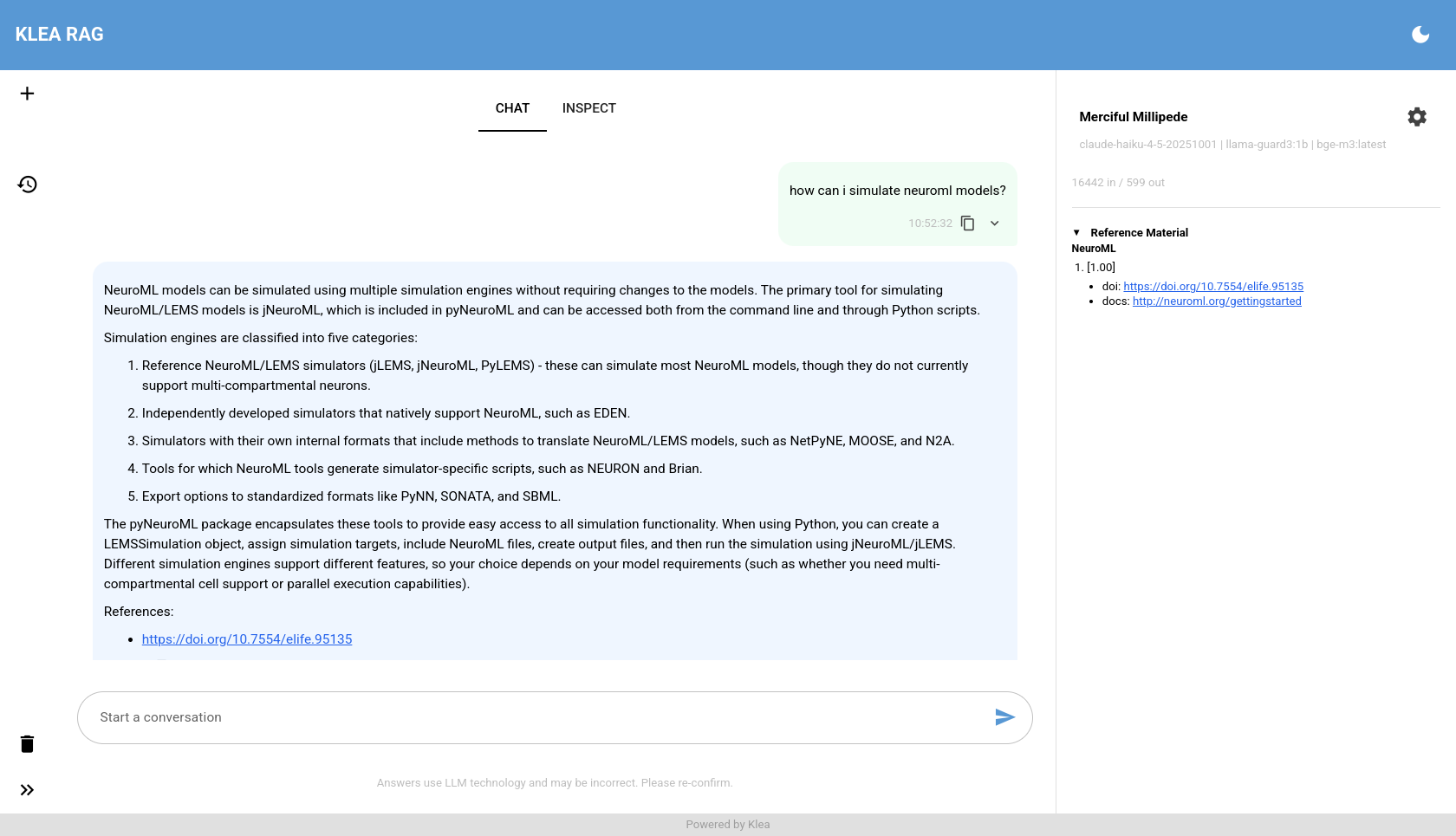
The chat pane: ask a question and receive a streamed, source-backed answer.
Status pane
The right pane summarises the current chat: its name, the model used
for each role (with a settings button to change them), running token
totals, and the per-step state sections that stream while the graph runs.
Tool calls appear here as they run, marked running and replaced by
ok/error when the round ends. In the agent, the operating mode and
tool access level selectors appear here as well.
Inspection pane
The inspection pane is the transparency view. It updates live as the graph runs: each pipeline step appends an entry as it finishes – for example classification, retrieval, answering and evaluation – with the step’s heading, how long it took, a short summary, and a collapsible View details panel holding the raw structured data for that step. That data renders as syntax-highlighted JSON (multi-line string values such as prompts are expanded for readability) with a copy button. Entries are grouped under a collapsible section per query (timestamp plus the query text), and the pane keeps every query’s section for the browser session instead of clearing after each one. This is what makes a Klea answer inspectable: you can see which sources were retrieved and how the pipeline arrived at its response.
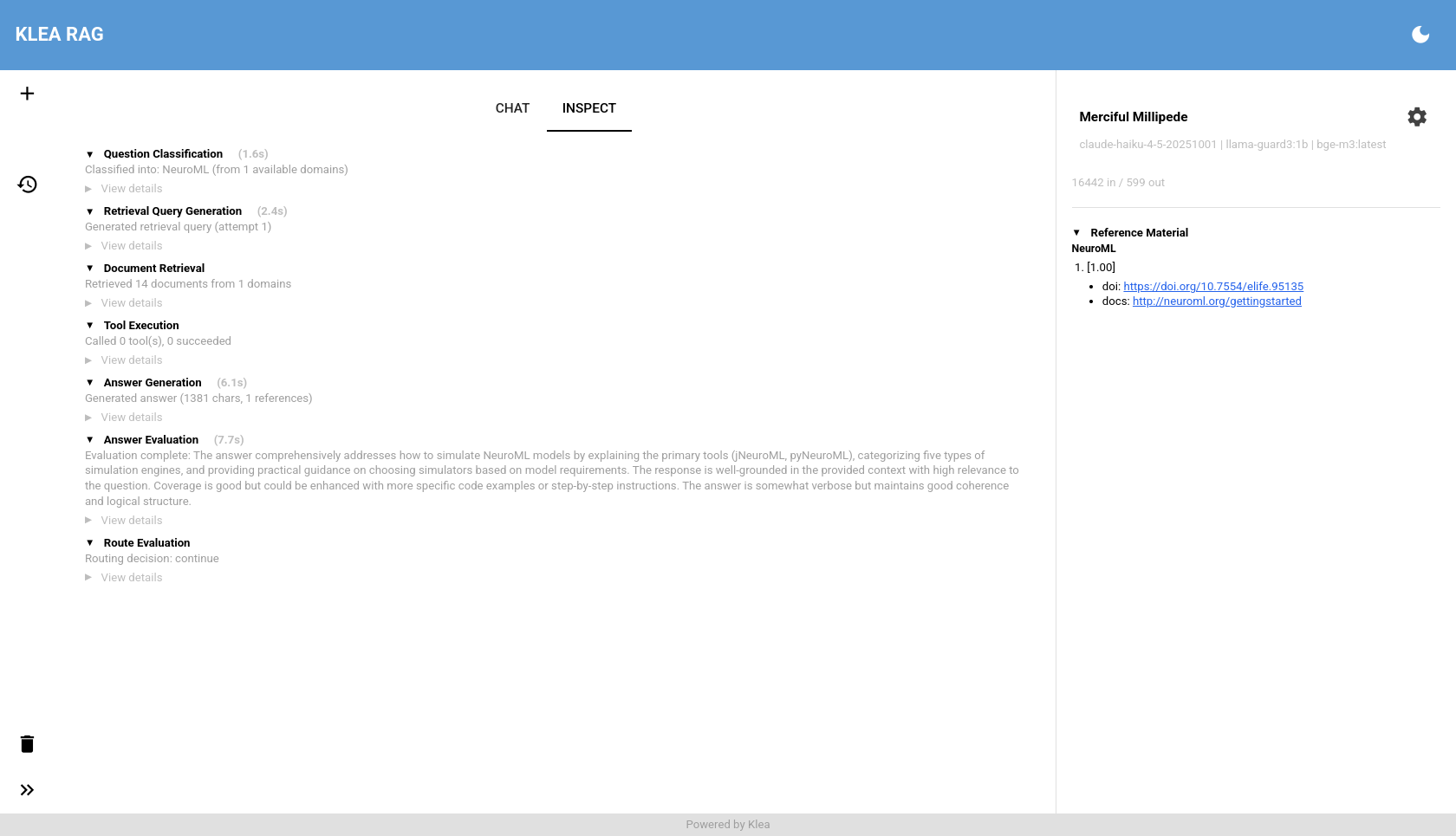
The inspection pane: the per-step trace behind the latest answer.
Sessions
Use the left pane to start a new chat or switch between existing ones.
Hovering a session shows when it was created plus a truncated preview of its
first query, so similarly named chats are easy to tell apart.
klea web opens the interface in your default browser on launch (pass
--no-open on a headless or remote host), and accepts --continue or
--resume <chat_id> to open the most recently updated or a specific session
on load. /exit – or the header’s power button, which confirms first –
stops the server this client launched, closes any active runs, and closes the
browser tab on a best-effort basis.
Commands
Type / in the input for a command menu. /help lists the available
commands: the browser fetches the server’s command catalogue and merges it
with the commands it handles itself. A client-side command (such as
/help) runs in the browser; a server-side command (such as /mode, the
agent’s operating mode) is sent to the agent. An unknown command is reported
locally and never sent. See Session commands for the list.
Models and API keys
The settings button opens the model dialog. Each role’s model is chosen with a provider field, a model field, and an optional custom URL, filled from the models.dev catalogue; free text is accepted for models not in the catalogue. Manage API keys opens the provider-scoped credentials editor: keys are stored per provider on the server, returned only in masked form, and expire after a period unused.
Human-in-the-loop
In the agent, a run can pause for your input. The ask replaces the composer:
while it is active the input box is hidden and the ask is shown in its place,
so you can still scroll the transcript: a plan awaiting review shows the plan
with Approve / Request changes / Cancel controls, a plan blocked
on a missing fact shows one field per question, and a tool call that would
touch a path outside the project directory (or a sensitive file inside it,
such as .env) shows one Once / Session / Deny choice per path.
Answering (or requesting a revision) resumes the same run with its state
intact.
Note
The screenshots on this page are captured from a local deployment and may lag the latest interface.
See also
Terminal interface – the terminal interface over the same backend
Session commands – the session-command catalogue
Create and use a RAG system – build a RAG system and query it through this interface
Klea RAG – the pipeline the inspection pane exposes