Create and use a RAG system
This guide walks through the full lifecycle of a Klea RAG system: preparing documents, building a vector store, configuring the RAG pipeline, and querying it.
Overview
By the end you will have:
A Chroma vector store populated with chunks from your own documents
A running Klea RAG server backed by that store
Hands-on experience querying the system via the CLI and web UI
New to RAG? Read RAG for an overview of how retrieval-augmented generation works and why you might use it.
Prerequisites
Python 3.12 or later
Packages installed (see install guide) with Chroma and ingestion extras:
pip install klea_rag[chroma,ollama] klea_utils[ingest]
Note
klea_rag[chroma]provides Chroma vector store support.klea_rag[ollama]provides the Ollama inference provider.klea_utils[ingest]pulls in Docling and its PyTorch dependency. The download is several hundred MB. On systems with a CUDA-capable GPU, PyTorch will use the GPU automatically for faster document processing.A running Ollama instance with the required models:
ollama pull qwen3:0.6b
ollama pull llama-guard3:1b
ollama pull bge-m3:latest
This guide uses Ollama for all inference (chat, guard, and embeddings). Klea supports other providers too – see Installation for HuggingFace, OpenAI, Anthropic, and other LangChain-compatible options.
Step 1: Prepare source documents
Place the files you want to index in a single directory. Docling handles a wide range of formats: PDF, HTML, Markdown, DOCX, PPTX, XLSX, images, and more (see Docling supported formats for the full list).
Here we will refer to this directory as
<folder-of-files>.
Deciding whether a PDF needs OCR
OCR (see Wikipedia)
recovers text from scanned/image-based PDFs, but it slows conversion of
born-digital (text-layer) PDFs considerably. The --ocr / --no-ocr
flag on build and chunk toggles it (default: on), but which
setting a given PDF needs cannot be told from its publication year –
older papers are often scans, yet many are born-digital, and some recent
PDFs are scans of print originals.
Instead, decide per file by whether the PDF has an embedded text layer.
klea-stores-create pre-check <folder-of-files> reads each PDF with
pypdfium2 and reports which need OCR:
klea-stores-create pre-check <folder-of-files>

Pre-check: 12 PDFs, 3 need OCR (image-based), 9 are text-based (no OCR needed)

  OCR    scanned-paper.pdf         pages=8 image_pages=8 chars=120
  no-OCR modern-paper.pdf          pages=15 image_pages=0 chars=48231
With --organise it copies the files (never moves them – your
original directory is left untouched) into ocr/ and no-ocr/
subdirectories, then prints the recommended workflow:
klea-stores-create pre-check <folder-of-files> --organise

# relocate the copies to a scratch dir so the source folder stays clean
mv ocr/ no-ocr/ /tmp/biblio-build/
cd /tmp/biblio-build
klea-stores-create chunk no-ocr/ --no-ocr
klea-stores-create chunk ocr/
klea-stores-create store no-ocr/ --collection my-docs --store chroma:/path
klea-stores-create store ocr/   --collection my-docs --store chroma:/path
The two store runs target the same collection, so they merge into
one store; no-ocr/ also picks up any non-PDF files (Markdown, DOCX,
etc.) that never need OCR.
Step 2: Create a vector store
klea-stores-create build <folder-of-files> \\
    --collection my-docs \\
    --store chroma:/path/to/my-store \\
    --bm25-store /path/to/my-bm25-corpus.pkl
The build command runs the full pipeline:
Convert – every supported file is parsed with Docling into a structured document.
Chunk – documents are split into token-aware chunks (450 tokens by default) using Docling’s
HybridChunker. Each chunk retains its heading hierarchy as metadata.Embed – chunks are embedded using
bge-m3(or whichever embedding model you configure).Store – embeddings and text are written to a Chroma vector store at the path you specify.
Flags explained:
--collection/-n– the collection name inside the store (e.g.my-docs). This must match thenameof the store’svector_stores/bm25_storesentry in the RAG config file (e.g.klea.json) – retrieval looks stores up by name, so a mismatch silently returns no results.--store/-s– the vector store URI (e.g.chroma:/path). For Chroma, point at the store folder; the database file inside it is always namedchroma.sqlite3(the filename is not configurable). A folder that does not exist yet is created. Because one Chroma store file can hold several collections, the--collectionname selects which collection within that file is used.--bm25-store– path to write the combined chunked documents to a single pickle file that can be used as a BM25 keyword store. Defaults to<collection>.pklin the current directory (always written); you can move the file afterwards and point the config at its new location.--model/-m– embedding model (defaultollama:bge-m3:latest).--max-tokens– maximum tokens per chunk (default 450).--ocr/--no-ocr– whether to perform optical character recognition (OCR, see Wikipedia) during PDF conversion (default: on). Keep it on for scanned/ image-based PDFs; pass--no-ocrfor text-based PDFs to speed up conversion considerably.--force/-f– re-process all files even if previously cached.
Docling’s inference accelerator is configured through environment variables rather than CLI flags. By default it auto-detects the best available device, but GPUs whose CUDA capability is below 7.0 (e.g. a Quadro P1000) fail the Triton compiler used for the layout model. Force Docling to the CPU in that case:
DOCLING_DEVICE=cpu DOCLING_NUM_THREADS=16 klea-stores-create build \\
    <folder-of-files> --collection my-docs --store chroma:/path/to/my-store
DOCLING_NUM_THREADS (default 4) sets the CPU threads used for model
inference; OMP_NUM_THREADS is honoured as an alternative.
Re-running klea-stores-create build on the same directory is safe –
it skips files whose content has not changed and skips chunks whose
hashes already exist in the store (idempotent). Adding new files to
the source directory and re-running adds only the new content
(incremental ingestion).
The source directory will contain a .klea-cache/ folder after the
first run. This caches converted chunks so subsequent runs skip the
expensive Docling conversion. Each chunk/store/build run
automatically prunes cache entries whose source file no longer exists
(e.g. renamed or removed files), so the cache always mirrors the source
directory and --force regenerates it cleanly. The cache folder
also holds the generated metadata-map.template.json (copy it out to
review; see below) and the per-collection store manifest.
Keep the .klea-cache/ folder: it is reused across runs – the chunk
cache avoids re-converting unchanged files, and the store manifest is
how store knows what is already indexed for incremental updates.
Deleting it forces a full re-convert and re-store.
The vector store folder will also have been created, with the
chroma.sqlite3 database inside it. Later runs point --store at
the same folder; the file is always named chroma.sqlite3.
Step 3: Configure the RAG system
Create an environment file (e.g. my-rag.env):
KLEA_RAG_CHAT_MODEL=ollama:qwen3:0.6b
KLEA_RAG_GUARD_MODEL=ollama:llama-guard3:1b
KLEA_RAG_EMBEDDING_MODEL=ollama:bge-m3:latest
Create the JSON configuration file (my-config.json) that wires the
vector store to a domain:
{
    "general": {
     "default_k": 5,
     "k_max": 10,
     "max_refs_size": 20000,
        "non_domain_chat": true,
        "fallback_to_training_data": true
    },
    "domains": {
        "MyDomain": {
            "description": "Documents related to my project",
            "vector_stores": [
                {
                    "name": "my-docs",
                    "path": "chroma:/path/to/my-store"
                }
            ],
            "bm25_stores": [
                {
                    "name": "my-docs-bm25",
                    "path": "/path/to/my-bm25-corpus.pkl"
                }
            ]
        }
    }
}
The config file is selected by its profile name: pass --profile
my-config to load my-config.json from the current directory (or from
the config directory; see Installation). To scaffold a ready-to-fill
config instead of writing one by hand, run
klea-rag-serve --profile template once in your project directory.
The general section controls retrieval behaviour:
default_k– number of documents to retrieve per query. This is the graph-wide default; individual vector stores can override it (see below).k_max– maximum number of candidates a store may fetch per retrieval pass. Once every store has reached its cap, the evaluator loop stops pulling more of the same query and reformulates it instead.k_maxdoes not bound what reaches the answer LLM – that ismax_refs_size’s job.k_inc– how muchkis increased by each time the evaluator requests more information.max_refs_size– total character budget for the reference material serialized into the answer LLM’s context (across all domains). The best-ranked chunks are kept up to this budget, so raisingdefault_kork_maxsurfaces more chunks only while there is budget left – useful when chunks are small and more of them help.non_domain_chat– whether to fall back to the LLM’s training data for questions that do not match any domain.fallback_to_training_data– whether to let the LLM answer from its own knowledge when retrieval returns nothing useful.
Each entry under domains defines a knowledge area with one or more
vector stores. The description helps the classifier route queries
to the right domain.
A store’s name must exactly match the --collection name passed
to klea-stores-create, and its path must match what was passed
to --store (for a vector store) or the location of the written BM25
corpus pickle. Retrieval looks stores up by name, so a mismatch means
the store is never queried.
A domain can also list bm25_stores. Each bm25_stores entry’s
path points to a combined corpus pickle written by
klea-stores-create --bm25-store (or klea-stores-create store
--bm25-store). If you did not pass --bm25-store, the corpus was
written to <collection>.pkl in the directory you ran the command
from; it can be moved anywhere before it is referenced here. When both
are configured, retrieval queries the vector stores and the BM25 stores
and combines the results with Reciprocal Rank Fusion – exact
name/symbol matches from BM25 complement the semantic matches from the
vector stores.
Vector stores can override the retrieval settings independently. Stores
that set their own default_k, k_max, and k_inc use those
values instead of the general fallbacks, which is useful when stores
cover corpora of very different sizes:
{
"general": {
"default_k": 5,
"k_max": 10,
"k_inc": 1,
"max_refs_size": 20000
},
"domains": {
"MyDomain": {
"description": "Documents related to my project",
"vector_stores": [
{
"name": "large-corpus",
"path": "chroma:/path/to/large-store",
"default_k": 10,
"k_max": 25,
"k_inc": 5
},
{
"name": "small-corpus",
"path": "chroma:/path/to/small-store"
}
]
}
}
}
Here large-corpus retrieves up to 10 documents and can grow to 25 in
steps of 5 when the evaluator asks for more context, while small-corpus
inherits the general settings (5, capped at 10, stepping by 1). The
dynamic k_inc/k_max adjustments only apply to stores that are
already loaded, so a store only grows once it has been queried once.
After the retrievers are queried, the fused results are truncated to the
global max_refs_size character budget, so k/k_max control how
many candidates are fetched while max_refs_size controls how much of
them reaches the answer LLM.
See also
Installation for details on HuggingFace, OpenAI, and other provider model naming conventions.
Step 4: Start the RAG server
For local single-user use this step is optional: the client commands in
Step 5 start a server on the local machine automatically when none is
already running. Run klea-rag-serve instead when you want a
persistent backend, for example to share one server between several
clients or to run it in a separate terminal:
KLEA_RAG_ENV_FILE=my-rag.env klea-rag-serve --profile my-config
The server loads the configuration, initialises the embedding model, and compiles the LangGraph pipeline. Once ready, check it is alive:
curl http://127.0.0.1:8005/health/ready
A 200 OK response means the system is ready to accept queries.
Step 5: Query the RAG
The client commands below use http://127.0.0.1:8005 by default.
If no server is running there, they start one on the local machine for
the session and stop it when they exit; if a server is already running
(for example from Step 4) they reuse it. Pointing --server at a
remote host connects without starting anything.
For an interactive terminal session:
klea-rag
This launches the Textual TUI (also available explicitly as klea-rag tui).
Type your questions in the input box; Ctrl+Q exits. The TUI requires the
[tui] extra (pip install klea-rag[tui]).
For a graphical interface, launch the NiceGUI web UI:
klea-rag web
The web UI uses NiceGUI and requires the [nicegui] extra.
The interface has a chat tab and an inspect tab. The inspect tab is the transparency view: it shows the pipeline steps taken for each answer, with their timings and structured details. See Web interface for a walkthrough of the interface.
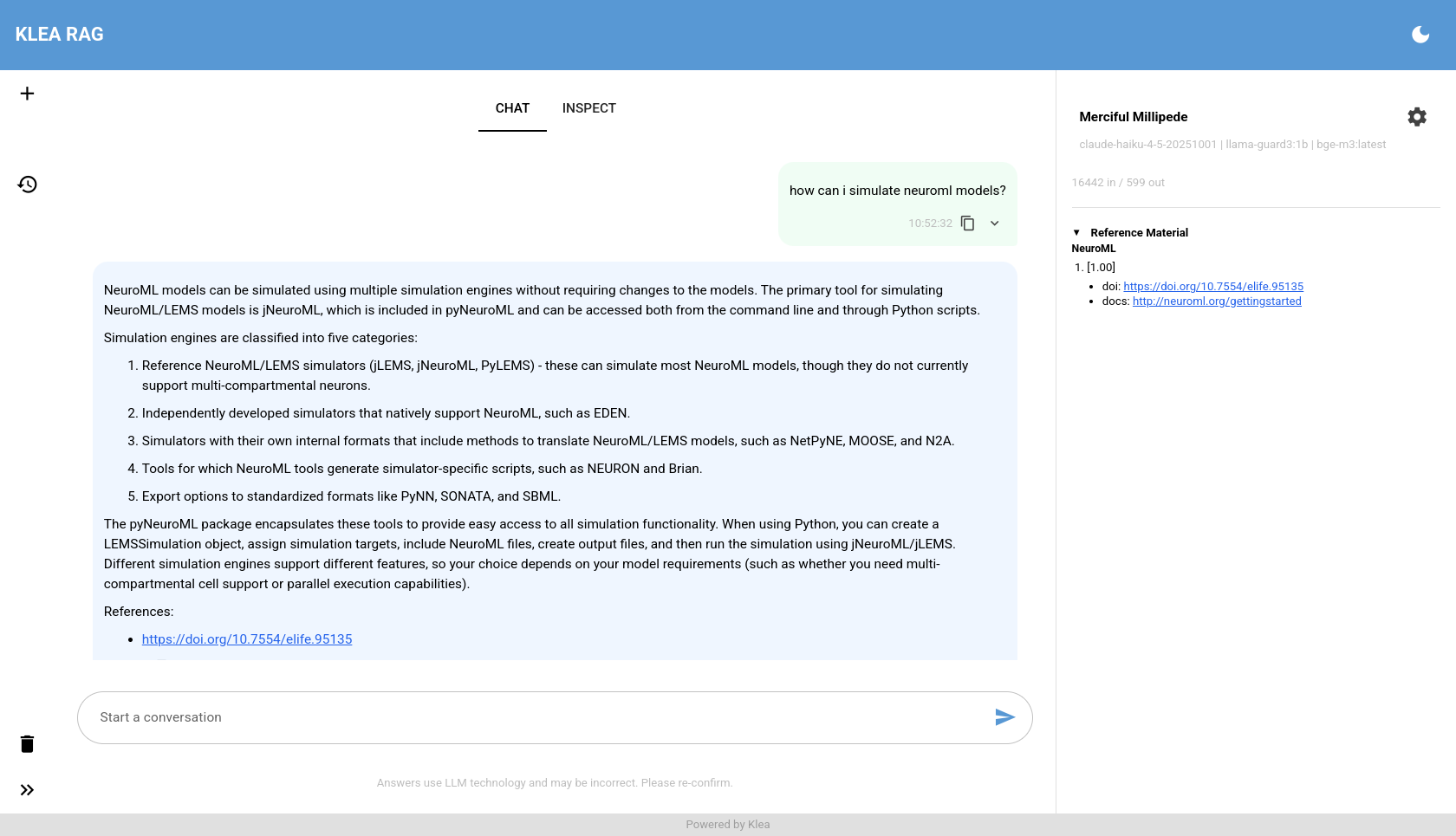
The chat tab.
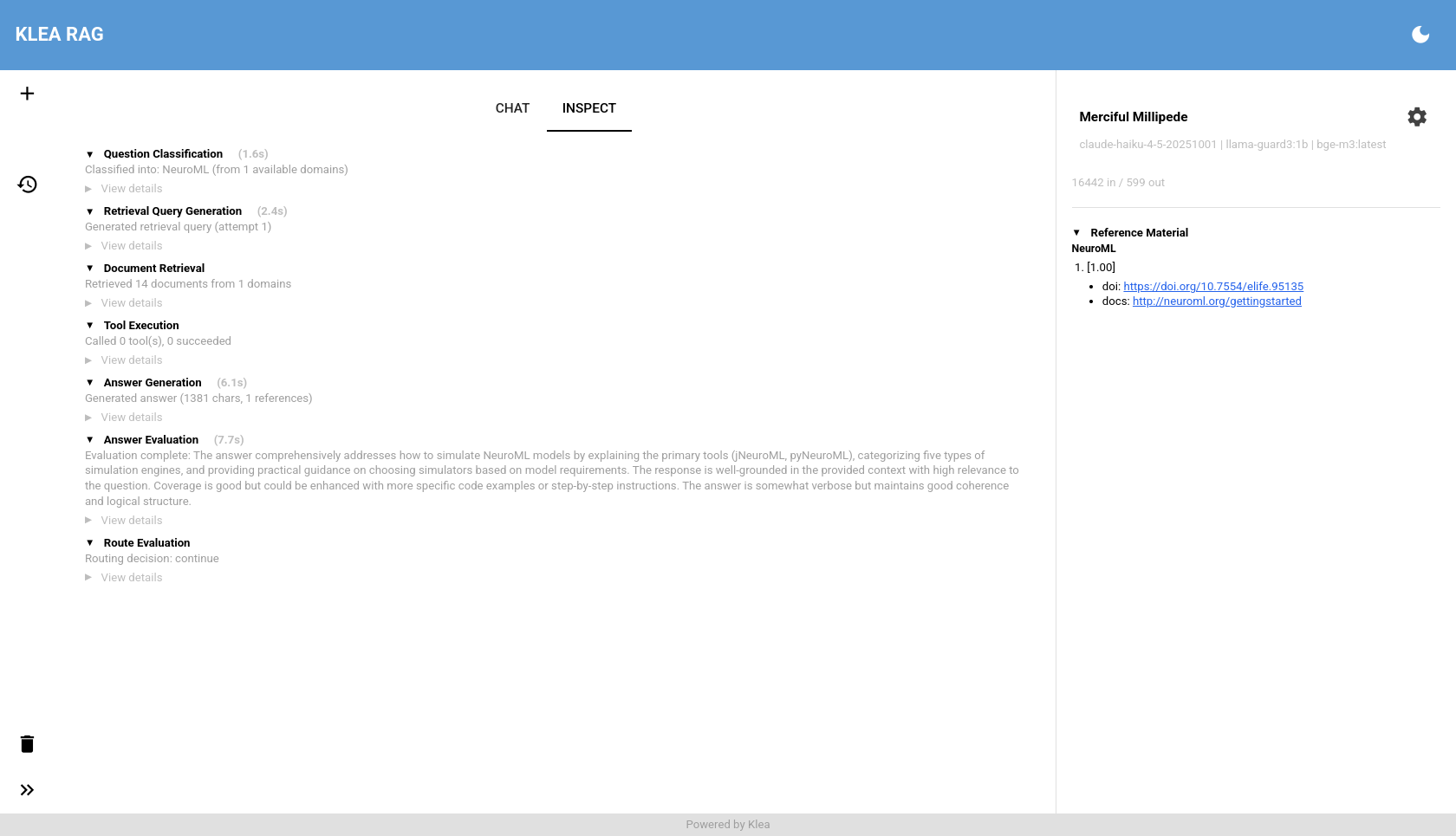
The inspect tab, showing the per-step trace behind the answer.
Both methods use the server at http://127.0.0.1:8005 by default.
Use --server to point at a different address.
Going further
Once the basic pipeline works, here are natural next steps:
- Metadata enrichment
Add source URLs or other metadata to retrieved chunks. First run
klea-stores-create chunkto generate ametadata-map.template.jsonin<source_dir>/.klea-cache/; copy it out to review. Each file’sDEFAULTentry is pre-filled automatically with bibliographic metadata (title, authors, keywords, DOI, URL) where it could be extracted – see Klea RAG for the extraction cascade. Review and correct the values (check the_metadata_completeflag), thenklea-stores-create store --metadata-map <file>. Seeklea-stores-create --helpfor examples. The reviewed map file may live anywhere (e.g. in the source directory); it is passed explicitly with--metadata-map. Runklea-stores-create map-lint <dir>any time (or read the summary printed afterchunk) for a quick, LLM-free health check of the map – it flags missing fields, suspicious titles/DOIs, year/filename mismatches, and other issues to fix before storing. It also verifies the map’s top-level keys are the actual source filenames: a source file with no entry is fatal (thestorestep would fail), so the full report is printed first and the command then exits non-zero, while keys that are not source files (e.g. a map keyed by heading titles) are flagged as stale or heading-keyed.- Different embedding models
Swap
ollama:bge-m3:latestfor a HuggingFace embedding model (see Installation for model naming conventions).- Multiple domains
Add more
domainsentries in the JSON config, each with its own vector store and description. The classifier will route queries automatically.- MCP tools
Add
mcp_serversto a domain config to give the LLM access to external tools (e.g. a NeuroML validation server). See the example inrag_pkg/example-configs/klea_rag.json.- Separate chunk-and-store workflow
Use
klea-stores-create chunkto convert and cache without writing to a store, thenklea-stores-create storelater. This lets you inspect the chunks and edit the metadata map before embedding.storeis cache-only: every file must already have been converted bychunk, and it never converts on the fly. Adding new files to the source directory means re-runningchunk(which is incremental and converts only the new files) and thenstore.storeis incremental by default: a store manifest in<source_dir>/.klea-cache/<collection>.manifest.jsonrecords which files are in the collection, so unchanged files are skipped and changed files are updated in place. Files removed from the source directory are never pruned automatically – pass--forceto drop the whole collection and rebuild it from scratch (the portable way to update a collection, since documents within a collection cannot be updated in place across all backends). Re-runningstore --forceafter editing the metadata map re-applies the new metadata.- Metadata map template
klea-stores-create chunkwritesmetadata-map.template.jsoninto<source_dir>/.klea-cache/(alongside the chunk cache anddoi-cache.json). To review it, copy it out (e.g. tometadata-map.json), edit, and pass the copy toklea-stores-create store --metadata-map <path>.- Hybrid keyword retrieval
Add a BM25 store alongside a vector store: run
klea-stores-create store --bm25-store /path/to/corpus.pkland add abm25_storesentry to the domain config. Retrieval then fuses semantic and lexical matches with Reciprocal Rank Fusion, which helps with exact names, symbols, and terminology. See Klea RAG for details.
Troubleshooting
For a full list of pitfalls (name/path mismatches, embedding dimension,
chroma.sqlite3 folder vs file, OCR, metadata maps, logs, HuggingFace
Spaces) see Troubleshooting.
- Ollama is not running
Start it with
ollama serveor run Ollama as a system service.- Model not found
Ensure you have pulled all three models (chat, guard, embedding). Run
ollama listto see what is available.- Server fails to start
Check that
KLEA_RAG_ENV_FILEpoints to a valid env file and that the--profilename resolves to a config file in the current directory or the config directory. Look for JSON syntax errors (trailing commas, missing quotes).- Queries return empty or irrelevant results
Increase
default_kin the JSON config. Verify the vector store path and collection name match. Check that your source files are in a format Docling supports. If raisingdefault_k/k_maxdoes not bring in more useful chunks, confirmmax_refs_sizeis large enough to fit them. See Troubleshooting for the complete checklist.
See also
klea-stores-create – full CLI reference for vector store creation
klea-rag-serve – server CLI reference
klea-rag – client CLI reference
StoresBuilder– Python API for ingestionVSRetriever– Python API forretrieval